AI Kitchen Design
Snap a photo of your kitchen and watch the AI restyle cabinets, counters, and lighting in seconds. Test a new look before you commit a single dollar to it.


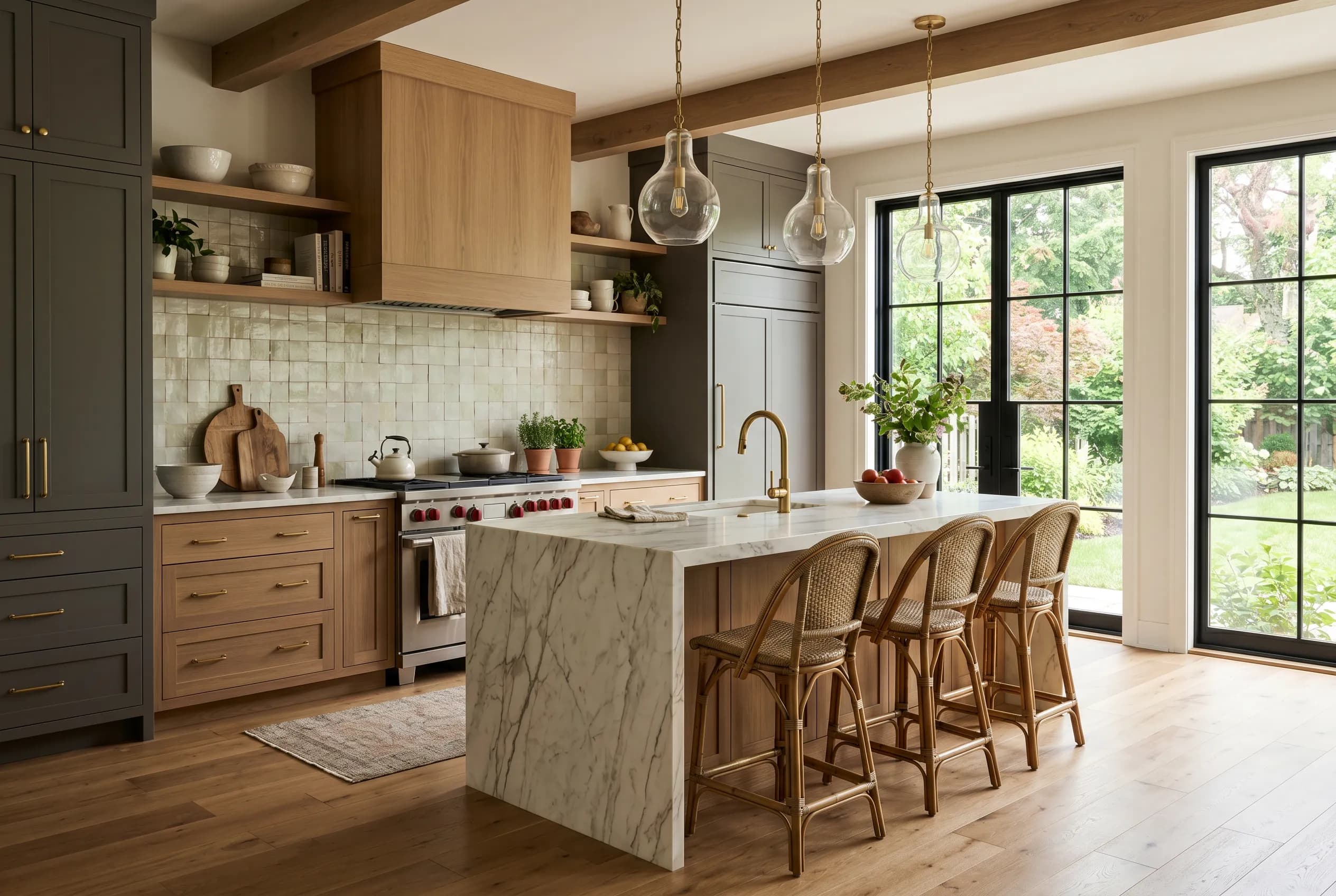
The kitchen is the hardest-working room in the house, and the most expensive to get wrong. Cabinetry alone can swallow half a renovation budget, so the difference between a slab-front in warm walnut and a shaker in muted sage is a decision worth seeing before the order goes in. A kitchen has to read as a single composition even though it is built from a dozen separate trades: cabinets, counters, backsplash, hardware, appliances, lighting, and flooring all have to agree.
Function leads here in a way it doesn't in a bedroom. The work triangle between sink, range, and refrigerator governs how the room actually feels to cook in, and the surfaces you choose live with heat, water, and knife marks every day. Good kitchen design balances that practicality with the fact that this is now a social room, where people gather at the island long after the cooking is done. Layout, sightlines from adjacent living space, and the height and warmth of the lighting all matter as much as the color of the doors.
Common Kitchen Design Challenges
Cabinetry sets the whole tone
Cabinets are the largest visual surface and the costliest single line item, so their color, door profile, and finish drive the entire room. Picking blind is risky.
Too many materials to coordinate
Counters, backsplash, flooring, and hardware all have to relate to each other and to the cabinets. One clashing finish can undo an otherwise careful scheme.
Lighting is layered and unforgiving
Kitchens need task light at the counter, ambient light overhead, and often accent light under cabinets. Get the color temperature wrong and good materials look flat or sickly.
Layout is mostly fixed
Plumbing and gas lines pin the sink and range in place, so most redesigns work within the existing footprint. The challenge is reading a fresh look onto bones you can't easily move.
Redesign Your Kitchen With AI
Point your phone at the kitchen and InteriorLab redesigns it in seconds, holding the room's actual layout while it swaps in new cabinet colors, counter materials, backsplash, and lighting. Try any of 19 styles to see the same space as warm farmhouse or crisp modern, then use Magic Erase and item editing to recolor just the cabinets, replace the pendant lights over the island, or strip out a fussy backsplash without touching the rest. Shop the Room links many of the fixtures and stools you see to real products, Furniture Fit lets you preview a counter stool or bar cart in AR before buying, and the Budget Planner finds combinations that fit a number you set. Save your favorites, compare before and after side by side, and export a high-res image to share with a contractor or cabinet maker.
Kitchen Design Tips
Anchor the room with one warm material
An all-white kitchen can read clinical. Bring in a single warm element, a butcher-block run, an oak island, or unlacquered brass hardware, to keep the space from feeling like a showroom. Test the warmth level in the app before you buy.
Treat the island as its own piece
Painting or staining the island a different color from the perimeter cabinets is one of the cheapest ways to give a kitchen depth. A deep green or charcoal island against pale uppers reads custom. Preview the contrast before committing the paint.
Match your backsplash to the counter, not the cabinets
A backsplash that picks up the veining or tone of the countertop ties the work zone together and makes the stone look intentional rather than dropped in. Recolor just the backsplash in the app to find the pairing that disappears in the right way.
Best Styles for a Kitchen
Kitchen Design FAQs
Can I keep my existing cabinet layout and just change the look?
Yes. InteriorLab works from a photo of your real kitchen, so it holds the existing footprint and cabinet runs while it restyles finishes, color, hardware, and lighting. That makes it ideal for planning a reface or repaint rather than a full gut.
Can the AI recolor only the cabinets without changing the counters?
It can. Highlight just the cabinets and the app will recolor or refinish that surface while leaving your counters, backsplash, and appliances as they are. You can also swap a single element, like the pendant lights or the faucet, on its own.
Which styles work best in a kitchen?
Modern, Scandinavian, farmhouse, industrial, transitional, and Mediterranean all suit kitchens well because each has a strong relationship to natural materials and honest hardware. The fastest way to choose is to run your own kitchen through several styles and compare them side by side.
Will the redesign show me products I can actually buy?
Many pieces in a result, stools, pendants, hardware, and small appliances, link to real products through Shop the Room. You can also preview a counter stool or bar cart in your kitchen using Furniture Fit in AR before you order, and set a budget so the app suggests combinations that fit.
Redesign another room
Redesign your kitchen today
Download InteriorLab free and see your new space in seconds with AI.